Add To Cart Redirect — A Small Tool That Can Save a Sale
There are times when a simple feature can quietly make a big difference. The Add To Cart Redirect tool, part of the Multi-Tool module for PrestaShop, is exactly that kind of feature. It doesn’t flood you with options or require any learning curve, but when you need it – it can save a customer, a sale, or even an entire campaign.
What It Actually Does
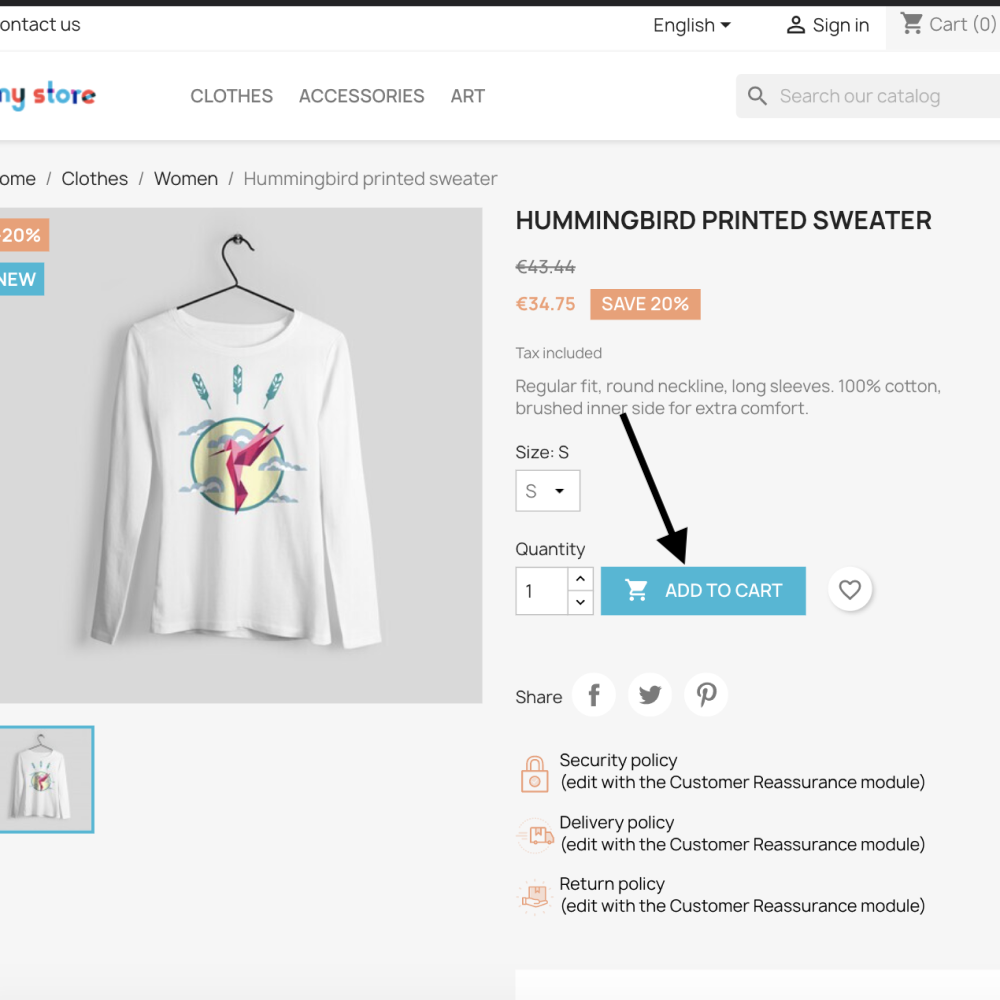
Normally, when someone clicks “Add to Cart” on your PrestaShop store, they’re sent straight into the default checkout flow. That’s fine for most cases, but what if you want that button to lead somewhere else?
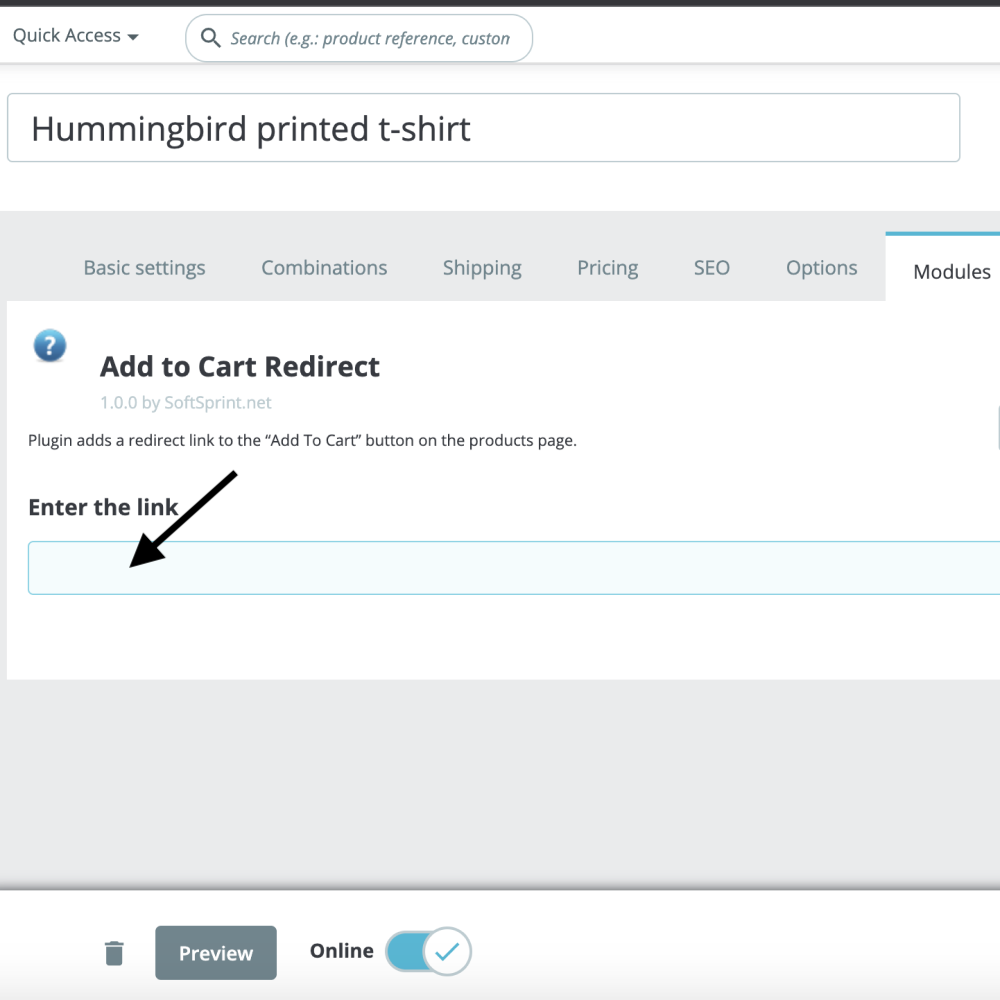
With this tool, you can make it happen. It lets you add a custom redirect link to the Add to Cart button on any individual product page. So instead of the native cart or checkout, the shopper can be taken to any URL you choose – another store, a marketplace listing, a landing page, or even a partner website.
When This Comes In Handy
You’d be surprised how often this simple tweak becomes useful. Here are a few real-world scenarios where it shines:
- Out of stock but available elsewhereImagine you’ve run out of a product, but it’s still in stock on Amazon, eBay, or maybe another branch of your own shop. Instead of showing “Out of stock” and losing the customer, you can just redirect them to where they can buy it. You keep the customer, even if the transaction happens elsewhere.
- Managing multiple storefrontsMany merchants operate more than one store – maybe one on PrestaShop, another on Shopify, or a separate site for a specific region. This redirect makes it easy to guide visitors from one shop to another, depending on where that product actually lives.
- Affiliate and cross-promotion linksMaybe you’re promoting a product from a partner site or an affiliate network. Instead of uploading it to your own store just to showcase it, you can list it on your PrestaShop catalog and redirect buyers directly to your partner’s checkout page.
- Testing new product ideasSome merchants use this tool for market research. You can temporarily redirect the Add to Cart button to a landing page or signup form, where visitors can learn more or join a waitlist. It’s a simple way to measure interest before committing to production.
- Event or pre-order campaignsHave a product coming soon? Instead of an empty cart, send users to a page with more info – maybe a countdown, a newsletter subscription, or a pre-order form. It feels seamless for the customer and helps you gather leads.
Why Store Owners Love It
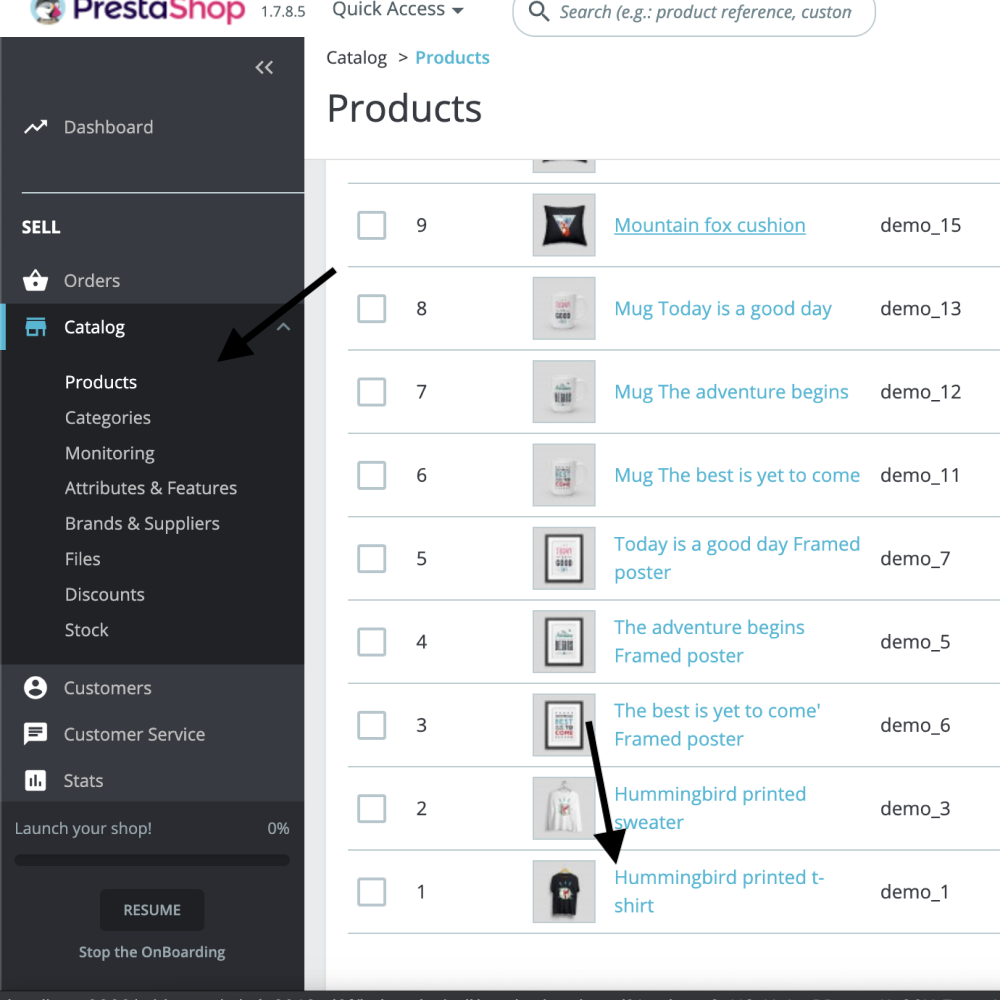
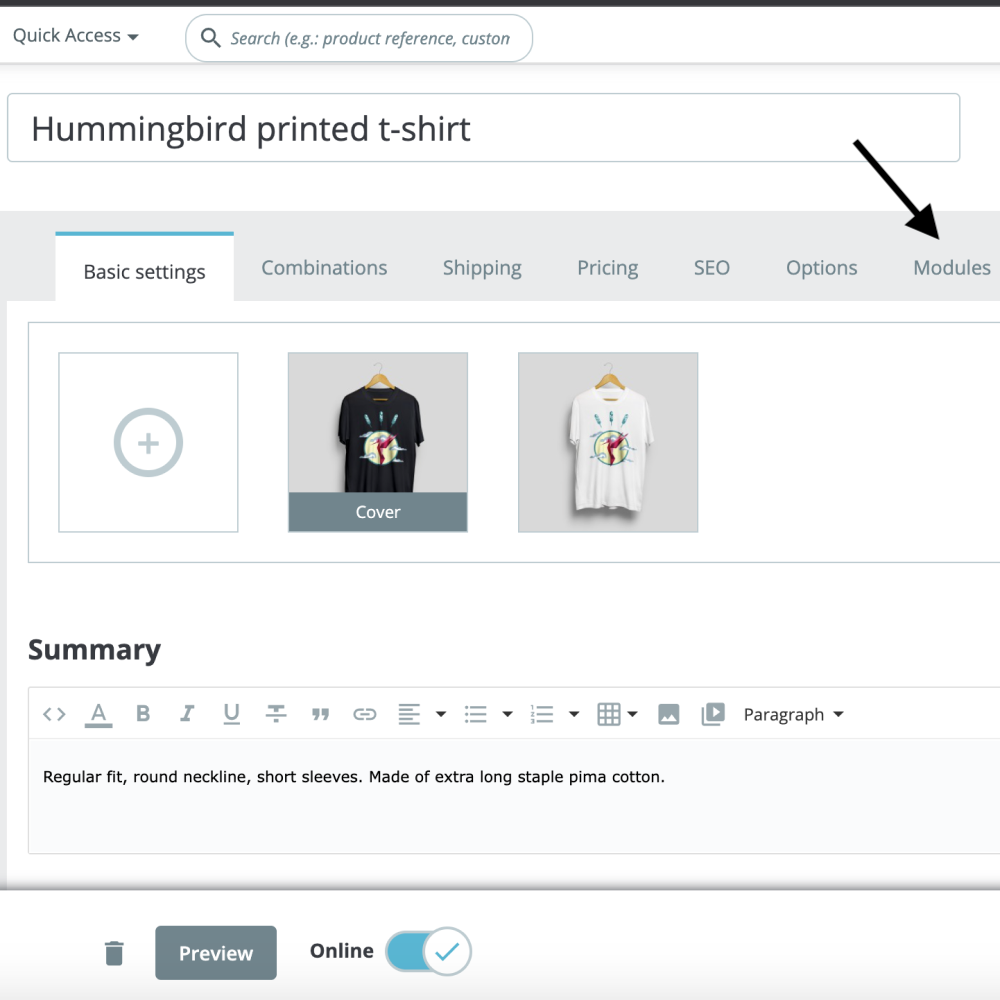
What makes this tool particularly nice is how effortless it is to use. You don’t need coding skills or extra setup. In the product’s edit page, under the module section, you’ll find a field where you can paste the redirect URL – and that’s it. Each product can have its own unique link, whether it’s internal (another page within your site) or external (Amazon, eBay, a custom landing page, etc.).
Why Customers Appreciate It Too
From the customer’s perspective, this feature just works. They don’t hit a dead end when something’s unavailable. They either get redirected to a place where they can still buy it or learn more. That smooth experience helps keep trust in your store intact – even if the final checkout happens somewhere else.
In Short
The Add To Cart Redirect tool might look small on paper, but it adds a layer of flexibility that every online store can use. Whether you’re bridging multiple platforms, running campaigns, or simply keeping buyers from walking away empty-handed – it gives you control over where that crucial click leads.
Sometimes, that’s all it takes to turn a missed sale into a satisfied customer.
How It Works in PrestaShop 9
Since PrestaShop 9 represents a major version bump (including upgrades to Symfony 6.4, compatibility with PHP 8.1-8.4 and other architectural changes) help-center.prestashop.com, using your “Add To Cart Redirect” tool in this environment means a few extra considerations and new opportunities.
Here’s how to think about it:
- Compatibility Check: Because PS9 introduces breaking changes, any module needs to declare its compatibility with PS9 (via the ps_versions_compliancy parameter) and ensure it uses the correct hooks and overrides (PrestaShop documentation). So you’ll want to confirm your module supports PS9 before you install or rely on it.
- Hook Usage & Redirect Logic: In PS9, some older hooks might have been deprecated or changed thanks to the new architecture. The redirect logic of your Add To Cart Redirect tool should ideally tie into a hook (for example: whenever the “Add to Cart” action is triggered). By ensuring your module uses the up-to-date hooks and respects PS9 structure, you’ll avoid conflicts or broken behaviour.
- Performance & UX: PS9 brings improved performance, modern front-end (e.g., new theme base) and better responsiveness (prestashop-project.org). This means your redirect should feel seamless: when a customer hits “Add to Cart”, the redirect works “instantly” without delays or lags. Make sure that the redirect URL is fast and reliable.
- Testing Environment: Upgrading to PS9 (or installing modules on PS9) comes with a bit more risk: modules not properly updated may cause errors. prestahero.com. So it’s good practice to test your store in a staging setup running PS9 before rolling out the redirect tool live.
How You Can Use the Tool in PS9 – Specific Scenarios
Here are some tailored use-cases that take advantage of PS9’s enhancements, along with how your Add To Cart Redirect tool fits in:
- Improved Multi-Store Setups With PS9’s upgraded admin interface and API, many merchants set up multiple stores (regional, niche, language-based). The redirect tool lets you direct “Add to Cart” clicks in one store to a different domain or storefront (for example a regional version), so you maintain a unified catalog in PS9 while still routing traffic appropriately.
- Campaign or Pre-Order Pages with Modern Theme Because PS9 supports modern themes and improved UI, you might have a landing page built in the front-end where you want traffic to go when someone tries to “Add to Cart” for a product not yet released. The redirect tool can send them there instead of the standard cart – this is especially smooth given PS9’s fast front-end.
- Fallback for Out-of-Stock or External Listings If a product is out-of-stock in your PS9 store but still available elsewhere (third-party marketplace, partner site), you can configure the tool so “Add to Cart” goes to that external link. PS9’s performance optimizations mean this experience can feel almost as “native” as staying in-store.
- Testing New Product Concepts in PS9 Since PS9’s architecture is more modular and developer-friendly (thanks to new Admin API etc.) you can experiment: for a limited time, redirect adds to cart to a “Join Waitlist” or “Notify Me” page, and measure interest. Then later revert to normal cart behaviour. The performance improvements in PS9 mean your tracking will be more reliable.
Best-Practice Tips for PS9
- Before installing, verify module compatibility, specifically that the redirect tool module version supports PS9 (and the PHP version you’re running).
- Use the staging environment of PS9 to test the redirect behaviour: check that the “Add to Cart” button still triggers correctly, that no other module interference exists, and that the customer flow doesn’t break.
- Monitor the user experience: your redirect should happen quickly (if there’s a delay or loading issue, you may lose the conversion) considering PS9 is quite fast. Use tools like browser dev-tools & PS9 logs.
- Consider using PS9’s new features (modern front end, API) to enhance your redirect landing destination – e.g., custom landing pages served via API hooks, faster themes, etc.
- Keep an eye on updates: modules may need to adapt to PS9’s evolving architecture (new hooks, deprecated ones). The official PS9 docs highlight that modules must comply with new Prestashop core updates.
- Ensure your redirect URL is secure (HTTPS) and well-optimized for mobile, since PS9 emphasises performance and modern UX.
In short: your Add To Cart Redirect tool is fully relevant and very useful in a PS9 setup – perhaps even more so, because PS9’s improved performance and architecture give you more freedom and better user-experience. Make sure your module is PS9-compatible, test thoroughly, and leverage PS9’s modern features to make the redirect flow seamless and effective.
If you like, I can write step-by-step instructions for setting up the tool in PS9 (with screenshots or menu path references) so your users can follow along easily. Would you like that?